Skip to content

Personalization

Computer Name

Changes the computer name. The name can be up to 15 characters long, and can't contain the following symbols: ~ ! @ # $ % ^ & * ( ) = + _ [ ] { } \ | ; : . ' " , < > / ?. Changing the computer name is optional.

Example: Hexandcube-PC

1
WMIC computersystem where caption="%computername%" rename "${VALUE}"

Common File Extensions

Toggles the visibility of common file extensions in Windows Explorer.

Common File Extensions - Example

System default: Hidden

1
REG add "HKCU\Software\Microsoft\Windows\CurrentVersion\Explorer\Advanced" /v HideFileExt /t REG_DWORD /d 0 /f
1
REG add "HKCU\Software\Microsoft\Windows\CurrentVersion\Explorer\Advanced" /v HideFileExt /t REG_DWORD /d 1 /f

Seconds in the taskbar clock

Toggles the visibility of seconds in the taskbar clock.

System default: Disabled

1
REG add "HKEY_CURRENT_USER\SOFTWARE\Microsoft\Windows\CurrentVersion\Explorer\Advanced" /v "ShowSecondsInSystemClock" /t REG_DWORD /d "1" /f
1
REG add "HKEY_CURRENT_USER\SOFTWARE\Microsoft\Windows\CurrentVersion\Explorer\Advanced" /v "ShowSecondsInSystemClock" /t REG_DWORD /d "0" /f

Require CTRL + ALT + DEL to login

Toggles the requirement to press Ctrl+Alt+Del to log in to Windows.

System default: Disabled

1
REG add "HKEY_LOCAL_MACHINE\SOFTWARE\Microsoft\Windows NT\CurrentVersion\Winlogon" /v "DisableCAD" /t REG_DWORD /d "0" /f
1
REG add "HKEY_LOCAL_MACHINE\SOFTWARE\Microsoft\Windows NT\CurrentVersion\Winlogon" /v "DisableCAD" /t REG_DWORD /d "1" /f

Verbose logon messages

Toggles the verbose startup, shutdown, logon, and logoff status messages. Verbose status messages may be helpful when you're troubleshooting slow startup, shutdown, logon, or logoff behavior.

System default: Disabled

1
REG add "HKEY_LOCAL_MACHINE\Software\Microsoft\Windows\CurrentVersion\Policies\System" /v "VerboseStatus" /t REG_DWORD /d "1" /f
1
REG add "HKEY_LOCAL_MACHINE\Software\Microsoft\Windows\CurrentVersion\Policies\System" /v "VerboseStatus" /t REG_DWORD /d "0" /f

Open Explorer to

Toggles the Open Explorer to option between Quick Access and This PC.

System default: Quick Access

1
REG add "HKEY_CURRENT_USER\SOFTWARE\Microsoft\Windows\CurrentVersion\Explorer\Advanced" /v "LaunchTo" /t REG_DWORD /d "1" /f
1
REG add "HKEY_CURRENT_USER\SOFTWARE\Microsoft\Windows\CurrentVersion\Explorer\Advanced" /v "LaunchTo" /t REG_DWORD /d "2" /f

Show Windows version on desktop

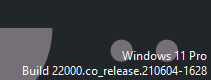
Toggles the Windows version watermark on desktop.

Windows version on desktop

System default: Disabled

1
REG add "REG add "HKCU\Control Panel\Desktop" /V PaintDesktopVersion /T REG_DWORD /D 1 /F"
1
REG DELETE "HKCU\Control Panel\Desktop" /V PaintDesktopVersion /F

Shell folders

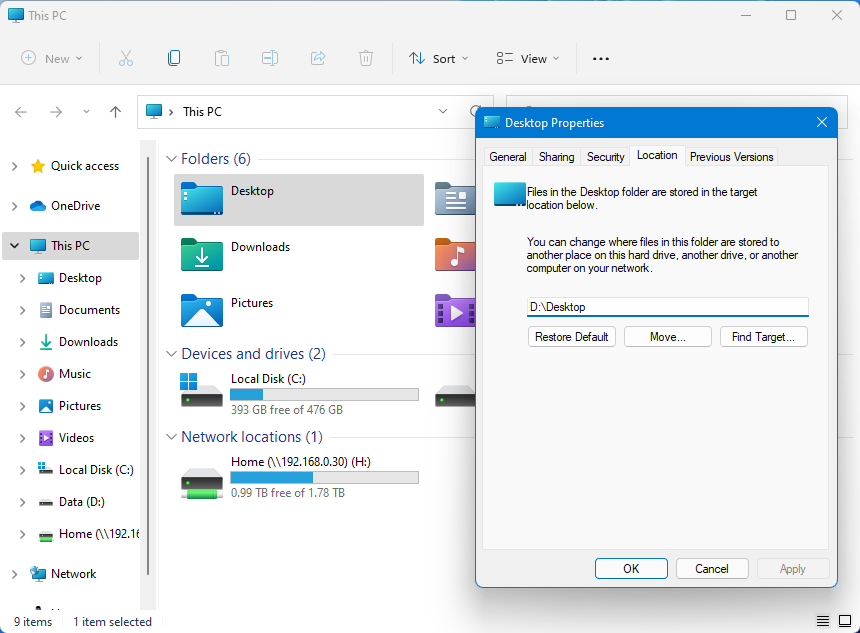
Changes location of Shell Folders: Documents, Pictures, Videos, Music, Desktop, Downloads

Desktop Shell Folder Location

1
2
REG add "HKCU\SOFTWARE\Microsoft\Windows\CurrentVersion\Explorer\User Shell Folders" /v "{F42EE2D3-909F-4907-8871-4C22FC0BF756}" /t REG_EXPAND_SZ /d ${VALUE} /f
REG add "HKCU\SOFTWARE\Microsoft\Windows\CurrentVersion\Explorer\User Shell Folders" /v "Personal" /t REG_EXPAND_SZ /d ${VALUE} /f
1
2
REG add "HKCU\SOFTWARE\Microsoft\Windows\CurrentVersion\Explorer\User Shell Folders" /v "{0DDD015D-B06C-45D5-8C4C-F59713854639}" /t REG_EXPAND_SZ /d "VALUET" /f
REG add "HKCU\SOFTWARE\Microsoft\Windows\CurrentVersion\Explorer\User Shell Folders" /v "My Pictures" /t REG_EXPAND_SZ /d ${VALUE} /f
1
2
REG add "HKCU\SOFTWARE\Microsoft\Windows\CurrentVersion\Explorer\User Shell Folders" /v "{35286A68-3C57-41A1-BBB1-0EAE73D76C95}" /t REG_EXPAND_SZ /d ${VALUE} /f
REG add "HKCU\SOFTWARE\Microsoft\Windows\CurrentVersion\Explorer\User Shell Folders" /v "My Video" /t REG_EXPAND_SZ /d "${VALUE}" /f
1
2
REG add "HKCU\SOFTWARE\Microsoft\Windows\CurrentVersion\Explorer\User Shell Folders" /v "{A0C69A99-21C8-4671-8703-7934162FCF1D}" /t REG_EXPAND_SZ /d ${VALUE} /f
REG add "HKCU\SOFTWARE\Microsoft\Windows\CurrentVersion\Explorer\User Shell Folders" /v "My Music" /t REG_EXPAND_SZ /d ${VALUE} /f
1
REG add "HKCU\SOFTWARE\Microsoft\Windows\CurrentVersion\Explorer\User Shell Folders" /v "Desktop" /t REG_EXPAND_SZ /d ${VALUE} /f
1
REG add "HKCU\SOFTWARE\Microsoft\Windows\CurrentVersion\Explorer\User Shell Folders" /v "{7D83EE9B-2244-4E70-B1F5-5393042AF1E4}" /t REG_EXPAND_SZ /d ${VALUE} /f

Context Menu

Classic context menus (Windows 11)

Restores the classic (pre-Windows 11) context menus. This option doesn't affect PCs running Windows 10.

System default: Disabled

1
REG add "HKCU\Software\Classes\CLSID\{86ca1aa0-34aa-4e8b-a509-50c905bae2a2}\InprocServer32" /f /ve"
1
REG delete "HKCU\Software\Classes\CLSID\{86ca1aa0-34aa-4e8b-a509-50c905bae2a2}" /f"
Back to top